Professional Email Signature Guide for Personal Trainer
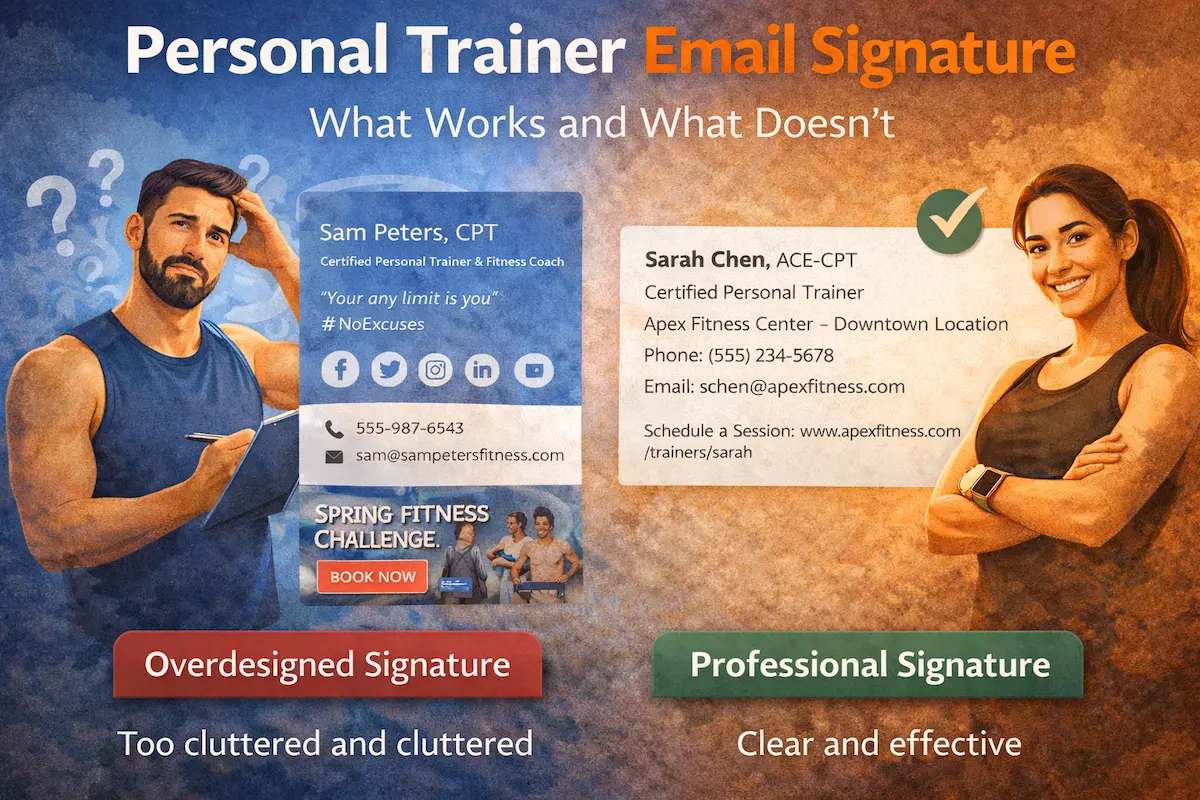
A personal trainer email signature is the last thing clients see in your communication, but it can quietly influence how professional, trustworthy, and organized you appear.
The problem is that most fitness professionals either overcomplicate their signatures with excessive graphics and promotional banners, or they leave out essential information that clients need to book sessions or ask questions.
Neither approach works particularly well.
This guide walks through what makes a personal trainer email signature effective, provides practical examples you can adapt, and explains what to include (and what to skip) for maximum clarity and professionalism.
If you want a clean, professional signature without dealing with design tools, you can create an email signature in minutes using a simple personal trainer email signature template.
Why Most Personal Trainer Email Signatures Miss the Mark
Walk through any gym inbox, and you’ll see two types of trainer signatures.
The first type is overdesigned. Large logos, motivational quotes, social media icons for six platforms, embedded images, and promotional graphics for upcoming classes. It looks impressive in the preview, but half the elements don’t display properly when clients forward the email or view it on mobile devices.
The second type is sparse. Just a name and a phone number. No certifications, no website, no clear indication of what services the trainer provides. Potential clients have to search for basic information that should be immediately available.
Both approaches create friction.
The overdesigned version overwhelms recipients and triggers image blocking in email clients. The minimalist version leaves clients guessing about credentials and how to take the next step.
What works is the middle ground: clear contact information, relevant credentials, and a straightforward way for clients to connect—without visual clutter or missing essentials.
What Actually Belongs in an Email Signature
A personal trainer email signature needs to answer three questions immediately:
Who you are professionally. This means your name, your role (Personal Trainer, Certified Fitness Coach, Strength & Conditioning Specialist), and the credentials that matter to clients. Certifications like NASM-CPT, ACE, ISSA, or specializations like Corrective Exercise Specialist or Sports Nutrition give clients confidence in your expertise.
How to reach you. Phone number and email address are non-negotiable. If you work at a specific gym or studio, include the location. If you train clients at multiple locations or offer virtual sessions, mention that briefly.
Where to learn more. A link to your website, booking page, or online training platform gives clients a clear next step. If you don’t have a dedicated website, a link to your gym’s trainer page or a simple scheduling tool works fine.
Everything else—social icons, banners, and excessive styling make signatures harder to read, especially on mobile devices, which is why many professionals rely on a clean fitness email signature template instead of overdesigning their layout. In real client communication, clarity always performs better than decoration.
The goal is simple: make it easy for a client to recognize you, contact you, and trust your professionalism.
Email Signatures for Different Fitness Roles
While the terms are often used interchangeably, a fitness email signature and a gym email signature can serve slightly different purposes. This distinction also affects how you approach a fitness trainer email signature, especially when balancing personal branding with clear communication.
A fitness-focused signature usually represents an individual trainer. It’s more personal, tied to direct communication with clients, and may include booking links or personal branding elements.
A gym email signature, on the other hand, represents a business. It may include company branding, location details, and general contact information rather than focusing on one trainer.
Also, not every trainer works the same way, and your signature can reflect that.
For example, yoga instructors prefer a more minimal and calm presentation. A simple layout with essential details works better than heavy branding. If you’re creating a fitness email signature for this type of role, tone and simplicity matter more than visual elements.
Strength coaches and personal trainers working in gyms may include slightly more structured information, especially if they operate within a larger organization.
Even though formats may vary, the principle remains the same: your personal training email signature should support communication, not distract from it.
Personal Trainer Email Signature Examples That Work
Here are practical examples that demonstrate different approaches based on how trainers work with clients.
Example 1: Independent Personal Trainer
Michael Rodriguez, NASM-CPT
Personal Trainer & Nutrition Coach
Los Angeles, CA
Phone: (555) 789-4321
Email: michael@fitnesspro.com
Website: www.michaelrodriguezfitness.com
This signature covers the essentials: name, certification, specialization, location, and three ways to connect. No clutter, no missing information. Clients immediately understand who Michael is and how to reach him.
Example 2: Gym-Based Trainer
Sarah Chen, ACE-CPT
Certified Personal Trainer
Apex Fitness Center – Downtown Location
Phone: (555) 234-5678
Email: schen@apexfitness.com
Schedule a Session: www.apexfitness.com/trainers/sarah
This version includes the gym affiliation and a direct scheduling link. Clients know where Sarah trains and can book immediately without additional steps.
Example 3: Online Fitness Coach
James Miller, ISSA-CFT
Online Fitness & Accountability Coach
Virtual Training Worldwide
Phone: (555) 456-7890
Email: james@millerfitnesscoaching.com
Book Your Free Consultation: www.millerfitnesscoaching.com/start
For virtual trainers, the signature emphasizes online availability and includes a clear call to action for new clients.
Example 4: Specialized Trainer (Yoga Instructor)
Priya Kapoor, RYT-500
Yoga Instructor & Wellness Coach
Serenity Yoga Studio – West End
Phone: (555) 321-6540
Email: priya@kapoorwellness.com
Class Schedule: www.kapoorwellness.com/schedule
Yoga instructors and specialized fitness professionals benefit from the same structure: credentials, contact information, studio location, and a link to relevant resources like class schedules or workshop information.
This is a good example of a yoga instructor email signature that stays clean and aligned with the tone of the profession.
How to Create a Professional Personal Trainer Email Signature
You don’t need design software or complex templates to build a professional signature.
The simplest approach: open a text editor, type out the six core lines (name, role, credentials, contact info, website), format it cleanly, and paste it into your email client’s signature settings.
Most email platforms—Gmail, Outlook, Apple Mail—have straightforward signature configuration options. You add the text, maybe apply basic formatting like bold for your name, and save it. Done.
If you want something slightly more polished without manual formatting, you can create a personal trainer email signature using a generator that handles the formatting and structure automatically.
You input your details, it produces clean HTML that works across email clients, and you paste it into your settings.
Either way, the goal is the same: clear information, consistent formatting, no unnecessary complexity.
Why Some Trainers Avoid Email Signatures Entirely
Interestingly, some fitness professionals skip email signatures altogether.
The reasoning usually falls into one of two categories:
They think it looks too formal. Personal training feels personal, and some trainers worry that a structured signature makes communication feel corporate or distant. They prefer keeping emails casual and conversational.
They don’t want to seem salesy. Including a website link or booking page in every email feels promotional to some trainers, especially when communicating with existing clients about routine check-ins or programming updates.
Both concerns are understandable, but they miss an important point: a signature isn’t about formality or sales. It’s about removing friction.
When a client needs to reschedule, they shouldn’t have to scroll through old emails to find your phone number. When someone refers to a friend, that friend shouldn’t have to ask how to reach you. A signature makes essential information consistently available without requiring extra effort.
That’s convenience, not corporate formality.
The Certification Question
One question that comes up frequently: which certifications should you include in your personal trainer email signature?
The general rule: include your primary certification and any specializations that differentiate your services.
If you’re a NASM-CPT with a Corrective Exercise Specialization and you work primarily with injury rehabilitation clients, both credentials matter. They directly relate to why clients choose you.
If you hold multiple general certifications (ACE, NASM, ISSA), pick the one most recognized in your market and include it. Listing three certifications doesn’t make you look more qualified—it makes the signature harder to read.
For specialized trainers—Yoga instructors (RYT-200, RYT-500), Pilates instructors (PMA-CPT), or sports-specific coaches—your specialized credential carries more weight than a general personal training certification. Lead with what matters most to your clients.
Final Thoughts
A personal trainer email signature works best when it’s clear, current, and focused on making it easy for clients to connect with you.
You don’t need elaborate designs, promotional graphics, or motivational quotes. You need your name, credentials, contact information, and a link to book or learn more.
That’s it.
Everything else is optional, and most of it creates more problems than it solves.
If you want to create a clean signature without dealing with formatting or design decisions, you can generate a professional email signature in a few minutes and have it working across all your devices immediately.