How Do WiseStamp and Signature.email Actually Work Differently?
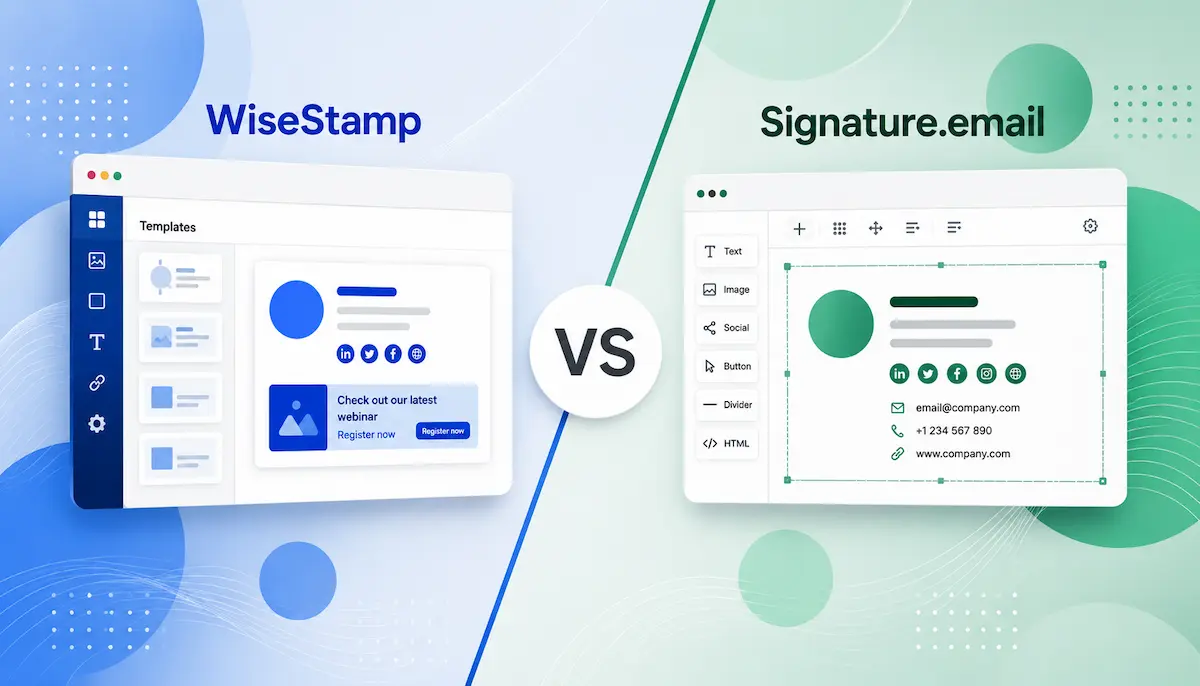
Since WiseStamp and Signature.email belong to the same category of tools for creating email signatures, they look quite similar at the descriptive level. Both services allow users to build a signature using a visual editor, work with templates, customize the design, and integrate with standard email clients.
They solve the same core problem—helping users structure an element of email communication that functions as a digital business card: who you are, who the message is from, and how you present yourself in a professional context.
However, the difference between the tools becomes noticeable once you start working in the editor. At that point, it becomes clear that they are based on different ideas of what an email signature should be.
WiseStamp allows you to turn it into a small marketing asset. You can add banners, calls to action, meeting links, and other elements. The signature remains part of communication, but an additional marketing layer is built around it.
Signature.email, on the other hand, stays closer to the original idea of a signature as a representation element. The main focus is on structure and visual control: users can precisely manage composition, spacing, alignment, and the overall layout logic. The tool focuses on giving more control over its visual presentation.
This WiseStamp vs Signature.email comparison breaks down the practical differences between the two tools, including editing experience, features, pricing, and usability.
If you need a professional signature without complex editing systems, you can create your email signature in minutes.
WiseStamp vs Signature.email: What Separates Them?
When comparing Signature.email vs WiseStamp, the main difference is how they approach editing.
With WiseStamp, the experience starts in a structured environment. You don’t begin from a blank canvas—instead, you move through predefined layouts and sections that already shape the direction of the signature. Even when customization is available, it rarely breaks out of that guided structure.
Signature.email works in the opposite way. There’s no strong push toward predefined layouts, and the editor behaves more like a modular space where you decide how everything is assembled. Blocks can be added, rearranged, and reshaped freely, and spacing becomes something you actively define rather than select from a set of options.
That difference in flexibility changes the experience quite noticeably.
With WiseStamp, building a usable signature usually doesn’t take long. With Signature.email, the process tends to shift toward a more deliberate, design-like workflow—not because it’s complicated, but because more decisions are left to the user. Layout, spacing, and structure are not predefined outcomes; they’re things you build step by step.
Neither approach is inherently better. The real difference is whether you prefer something that moves quickly with fewer decisions, or something that gives you full control over the structure.
Editing Experience and Workflow
The email signature editor experience is where the practical differences become obvious.
WiseStamp keeps things lightweight at the start. The editor is easy to navigate, the structure feels predictable, and you rarely face too many layout decisions at once. For freelancers, consultants, or small teams that just want a clean signature without spending time on setup, this approach tends to feel straightforward and comfortable.
Signature.email requires more active involvement. It gives you much more control over how the signature is assembled, but that also means every part of the structure becomes a decision—layout hierarchy, spacing, content blocks, and visual arrangement all need to be defined during the process itself.
That level of control is useful for people who care about fine-tuning. But for users who only need to set up a signature once and occasionally update it, the process can feel more involved than necessary.
Email signatures are not something most people actively work on every day, so a highly flexible system is not always the most efficient choice in the long run.
Templates and Layout Flexibility
Both tools provide modern templates and cover the basic elements most users expect—profile details, social icons, links, images, and contact information. On the surface, the starting point is similar.
The real difference appears once editing begins.
WiseStamp keeps templates more structured. You can adjust colors, sections, and certain visual elements, but the overall layout logic remains fairly predefined and consistent.
Signature.email is far less constrained.
It behaves more like a visual layout builder than a traditional signature generator. Sections can be moved more freely, spacing can be adjusted with more precision, and the final result can feel significantly more custom. For users who treat layout as an important part of branding, this level of flexibility can be useful.
At the same time, more flexibility introduces more complexity. The more control you have, the more time you may spend adjusting details that don’t necessarily improve communication itself.
And that’s where the trade-off becomes clear—at some point, simplicity can be more practical than maximum control.
WiseStamp vs Signature.email Pricing
Pricing is another area where users begin comparing the platforms more seriously, and the two tools use fundamentally different pricing models.
Signature.email offers two distinct approaches:
- Individual plan: $19 one-time payment for a lifetime account (one personal signature, unlimited fields and images)
- Company plans: Monthly subscription starting at $19/month for up to 50 employees, $29/month for up to 150 employees, and $39/month for up to 300 employees
This separates individual users from teams. Freelancers and solo professionals can pay once. Companies pay monthly based on team size tiers, not per user.
WiseStamp uses a subscription-only model with per-seat pricing:
- Pro+: $9/month (includes 1 seat, additional seats $2 each)
- Basic: $29/month (includes 10 seats, additional seats $1 each)
- Grow: $79/month (includes 25 seats, additional seats $1 each)
- Advanced: $299/month (includes 100 seats, additional seats $1 each)
All WiseStamp plans bill annually and require at least 3 seats for standard plans (except Pro+). The pricing gets more complex as teams grow because the base cost adds to per-seat charges.
For individual users, Signature.email’s $19 lifetime option eliminates recurring costs. For small teams (5-10 people), both platforms cost similar amounts monthly. For larger teams (50-150+ employees), Signature.email’s flat-rate tiers can cost significantly less since there’s no per-user charge.
The main question is whether most users actually need a recurring subscription for something as static as an email signature.
The Trade-Off Between Features and Simplicity
Both WiseStamp and Signature.email offer extensive features and customization options. On paper, this makes them look more powerful than simpler alternatives.
But in practice, feature depth often adds workflow complexity. Most users don’t want to spend time managing marketing campaigns, adjusting layout spacing, or configuring dynamic content for something that should stay lightweight.
The more features a platform adds, the easier it is for the tool to become the focus instead of the outcome.
For many freelancers, consultants, creators, and small business owners, the ideal workflow is simpler:
- create the signature once
- install it
- occasionally update details
- move on
That’s why many users eventually look beyond both marketing-focused platforms and design-focused builders.
A simpler generator with clean HTML, straightforward setup, and minimal friction often ends up being more practical long term.
If you need a clean, professional signature without subscriptions or complex platforms, you can create your email signature in under 5 minutes and use it permanently across all email clients.
Final Thoughts
Both WiseStamp and Signature.email are capable tools, but they solve the same problem in very different ways.
WiseStamp focuses more on structure, accessibility, and guided workflows. Signature.email focuses more on flexibility, modular editing, and customization depth.
For users who actively enjoy design control, Signature.email may feel more capable.
For users who prioritize speed and simplicity, WiseStamp may feel easier to use.
But many professionals ultimately discover that they do not need either extreme.
In most cases, a professional email signature does not need advanced editing systems, complex customization layers, or another subscription-heavy workflow. It simply needs to look clean, work reliably, and stay easy to maintain over time.